Guidance for Clinical Photography
1. General Principles
Use a digital camera or smartphone with good resolution. Ensure the lens is clean.
Obtain informed patient consent before taking photos.
De-identify images (do not include faces unless clinically necessary).
Ensure the patient is comfortable and positioned appropriately.
2. Lighting
Use natural daylight where possible (near a window, but avoid direct sunlight). If using indoor lighting, ensure the area is well-lit and avoid shadows.
Do not use the flash unless needed – it can cause glare on the skin.
Avoid strong colour casts (e.g. from theatre lights or tinted lamps).
3. Number and Type of Photographs
Provide at least 3 photos per lesion/area:
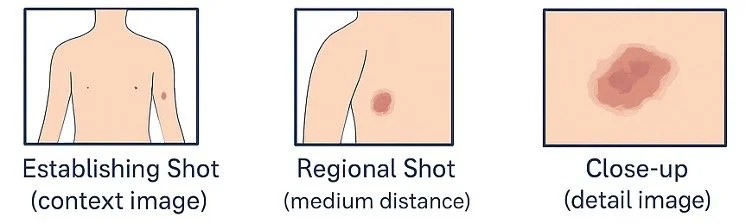
Establishing Shot (context image) – Shows the lesion/rash in relation to the whole body part (e.g., full arm, face, or torso).
Regional Shot (medium distance) – Closer image showing the lesion/rash and surrounding skin.
Close-up (detail image) – Taken as close as possible while still in focus, showing detail of colour, border, and surface features.
Optional: Dermatoscope image if available (these are not essential for rashes); additional angles for raised or irregular lesions.
4. Technical Tips
Hold the camera steady and focus on the lesion.
Use the macro mode (flower symbol) or tap-to-focus on smartphones for close-ups.
Take photos perpendicular to the skin (not at an angle unless doing so to indicated a raised lesion).
Place a scale marker (ruler or coin) next to the lesion for size reference, but avoid covering the lesion/rash.
If photographing multiple areas, label them clearly (e.g., “left forearm”, “back of shoulder”).
If images are historical please label with date.
5. File Handling
Save images in JPEG format.
Do not alter, crop, or filter the images.
Upload securely with the referral via SR referrals.
Examples of Recommended Photographs
Below are examples of the types of images to provide:
Establishing Shot e.g. Full arm or torso view
Regional Shot - Closer image of the affected area with surrounding skin
Close-up - Focused image of the lesion/rash showing borders and details